
The problem
Sharing a Google Doc, Sheet, or Slide is easy. Controlling what people do after they open it is harder.
If you have ever shared internal documents, client reports, or sensitive data, you have probably asked whether you can stop people from downloading or copying the file. By default, collaborators often can download, copy, or print unless you change the advanced sharing settings. There is a straightforward way to tighten that up.
The fix: restrict download, copy, and print
Google Docs, Google Sheets, and Google Slides use the same Share dialog. In Settings (gear icon), People who can download, copy, and print is controlled with two checkboxes: one for Editors and one for Commenters and viewers. Uncheck the roles you want to block from those actions.
Plan roles and both toggles together: you can restrict exports for viewers only, for everyone including editors, or leave download and copy on for editors while turning them off for read-only access.
Step by step
1. Open Share
- Click Share (top right).
- Add people or set who can open the file, and their role (Viewer, Commenter, or Editor).
2. Open advanced settings
- In the Share dialog, open Settings (gear icon).
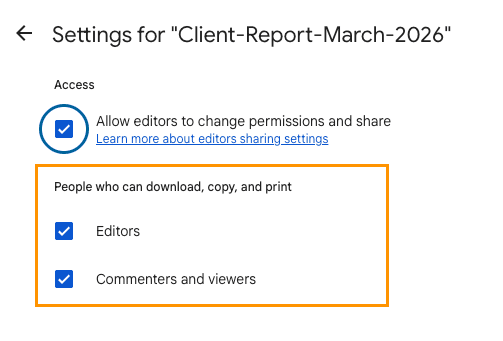
3. Adjust download, copy, and print
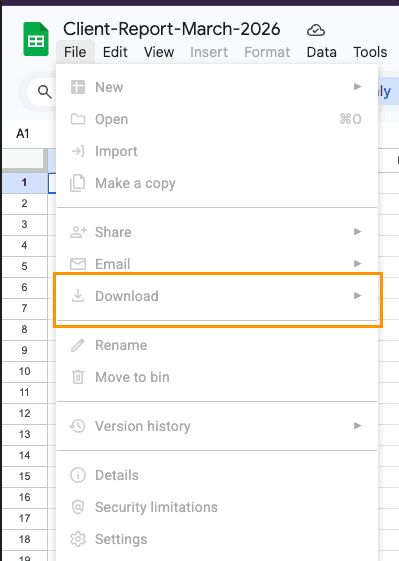
Under People who can download, copy, and print, turn off Commenters and viewers and/or Editors depending on who should keep File → Download, Make a copy, print, and similar actions.
When a role is excluded, those entry points are usually greyed out or missing in the editor UI for people in that role.
When this helps
Use it when you want people to work or read in the browser without an easy one-click path to a local copy, for example:
- Client deliverables you mean to stay in context
- Financial or internal figures shared on a need-to-know basis
- Proprietary research, decks, or read-only announcements
It is friction for casual copying, not a guarantee that content stays secret.
Limitations
This improves control; it is not absolute protection. People can still capture content by screenshotting, retyping, or using other tools. Treat it as reducing easy export, not as a full security boundary for the highest-sensitivity data.
Best practices
- Prefer sharing with named people or a defined group instead of a wide Anyone with the link if you can.
- Match Editor vs Viewer / Commenter to real needs, then align the Editors and Commenters and viewers download checkboxes with who should be allowed to export.