
Publishing a Python package is only half the story. After the release goes out, you still want to know whether people are installing it or if a new version has changed usage patterns.
The Python Package Index (PyPI) hosts your package and is where tools like pip and uv install it from by default. PyPI does not include a usage dashboard, so download stats live elsewhere.
For real-world usage numbers, most people use aggregators like pypistats.org, which offer a web UI and an HTTP API.
The Problem: Fragmented Insights
Relying solely on a web interface does not scale for continuous release management. Checking the site manually each week is tedious and does not belong in a repeatable, automated routine.
While APIs offer automation, assembling the full picture is rarely behind one URL:
- Scattered endpoints: Totals, Python version splits, and OS breakdowns are exposed as separate calls.
- Maintenance overhead: Assembling what you need means fanning out requests, normalizing JSON data in your own scripts, and updating custom glue code when API payloads or endpoints change.
- Manual effort: Disjointed workflows mean the data is only collected if you remember to look.
The Solution: Native GitHub Actions Integration
If your project already uses GitHub Actions for tests, releases, documentation, or scheduled jobs, package statistics belong in that same pipeline. You can fetch stats on a schedule or right after a release, without writing your own glue scripts or babysitting API rate limits.
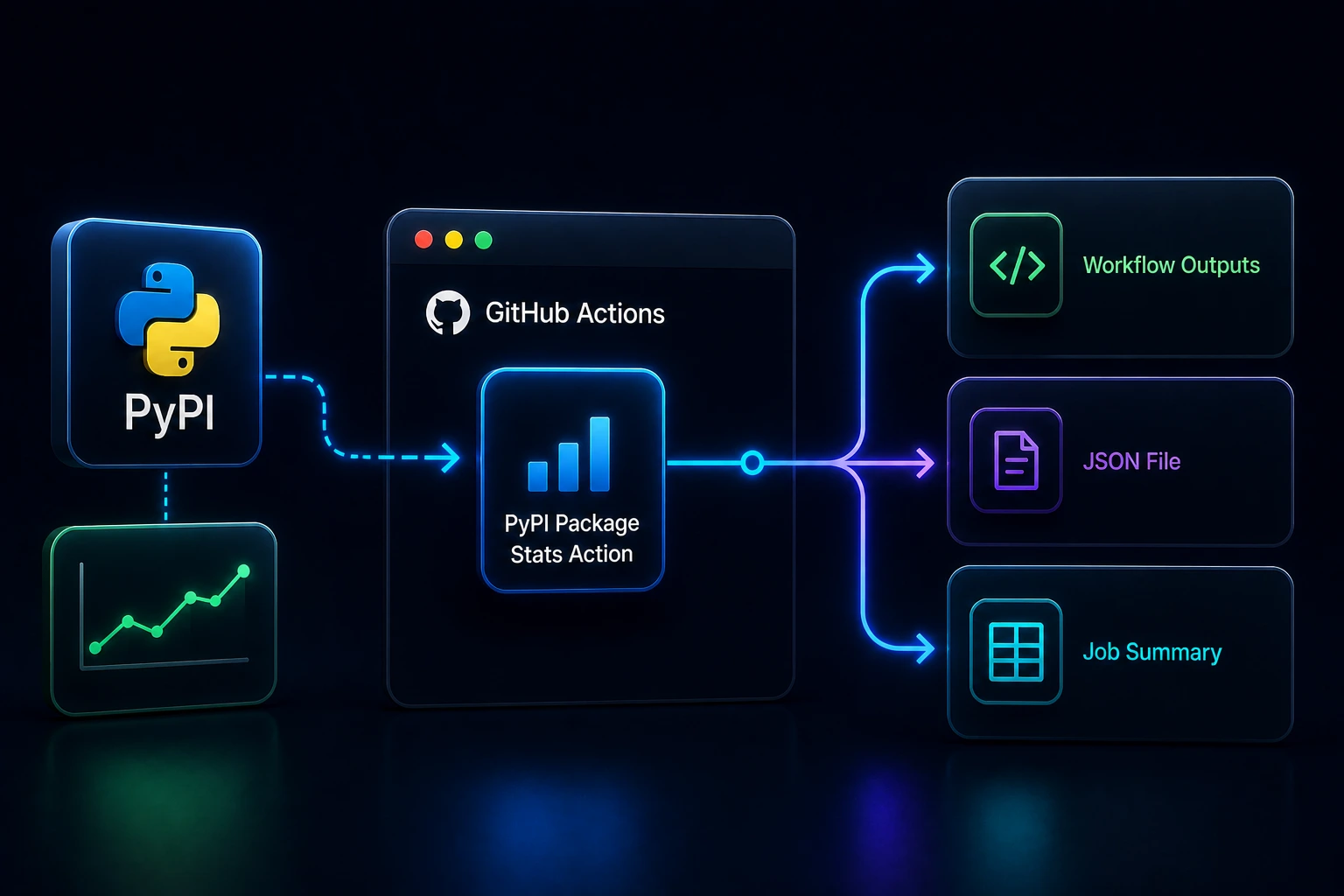
The PyPI Package Stats Action is a GitHub Action that fetches PyPI package download statistics and metadata directly within your workflow. It is powered by the pypi-package-stats library and consolidates your data collection into one simple step, outputting three useful surfaces:
- Workflow Outputs: Easily accessible variables for downstream workflow steps.
- JSON file:
stats.jsonby default in the workflow workspace (metadata and downloads in one snapshot). - Job Summary: A Markdown stats table surfaced on the GitHub Actions run.
Start With One Step
The required input is package-name:
- uses: ysskrishna/pypi-package-stats-action@v1
  id: stats
  with:
    package-name: 'requests'

- run: echo "Downloads last month: ${{ steps.stats.outputs.last-month-downloads }}"
Give the step an id when a later step references steps.<id>.outputs.*. If you only need the Job Summary or the JSON file on disk, you can omit it.
Outputs for Quick Signals
The action exposes:
name,versionlast-day-downloads,last-week-downloads,last-month-downloadsstats-json(full payload as a string)
For example, warn when monthly downloads fall below a threshold:
- uses: ysskrishna/pypi-package-stats-action@v1
  id: stats
  with:
    package-name: 'your-package-name'

- name: Check monthly download threshold
  run: |
    downloads="${{ steps.stats.outputs.last-month-downloads }}"
    if [ "$downloads" -lt 1000 ]; then
      echo "::warning::Monthly downloads are below 1000: $downloads"
    fi
It isn't a substitute for dedicated analytics, but it keeps a simple package health signal next to the workflow that publishes or reports on the package.
The Full JSON Payload
The action writes a JSON file (stats.json by default) with package metadata, download counts, Python version breakdowns, and operating system breakdowns.
Typical payload:
{
  "package": {
    "name": "requests",
    "version": "2.32.3",
    "upload_time": "2024-05-29",
    "description": "Python HTTP for Humans.",
    "author": "Kenneth Reitz",
    "license": "Apache-2.0",
    "home_page": "https://requests.readthedocs.io",
    "pypi_url": "https://pypi.org/project/requests/"
  },
  "downloads": {
    "last_day": 2500000,
    "last_week": 17500000,
    "last_month": 75000000,
    "last_180d": 450000000
  },
  "python_versions": [
    { "version": "3.12", "downloads": 5000000, "percentage": 35.0 },
    { "version": "3.11", "downloads": 4000000, "percentage": 28.0 }
  ],
  "operating_systems": [
    { "os": "Linux", "downloads": 12000000, "percentage": 68.0 },
    { "os": "Windows", "downloads": 3500000, "percentage": 20.0 },
    { "os": "Darwin", "downloads": 2000000, "percentage": 12.0 }
  ]
}
That shape works well for scheduled jobs: attach it as an artifact, compare across runs, or pass it into a script that updates docs or internal reports.
Job Summary for Quick Reviews
The third output surface is the GitHub Actions Job Summary. The action automatically adds a Markdown stats table to the run summary, so the human-readable view is available without another step.
That matters when you are reviewing a workflow run after a release. Instead of opening logs and searching for echo output, you can open the Summary tab and see the package stats in one place.
The summary is especially handy for:
- release runs where you want a quick package status snapshot;
- scheduled reporting jobs where the workflow run itself is the record;
- team workflows where not everyone wants to inspect raw JSON.
Example Workflows Worth Copying
The examples repository has complete workflows for the common paths:
- Basic print stats fetches stats and prints them in a workflow.
- Check download threshold warns when monthly downloads fall below a chosen number.
- Custom output path writes the JSON to a path you control.
- Save stats as artifact keeps the generated stats file attached to the run.
Those examples are better starting points than building the YAML from memory, especially if you want to adapt the action for a scheduled monthly report or a release pipeline.
What the Numbers Mean
If you're already using GitHub Actions, this adds almost no overhead:
- One step to fetch stats
- Optional logic based on outputs
- Automatic Job Summary so humans get a readable view without extra tooling
Instead of checking stats manually, you make them part of the same system that builds and ships your package.
What you get, though, isn't a real-time install counter. The data reflects upstream aggregation, so it's best treated as practical package analytics rather than exact usage tracking.
For quick decisions in workflows, the most useful signals are:
- Last day downloads
- Last week downloads
- Last month downloads
When you need more context, the JSON output includes richer details like metadata, 180-day trends, Python version breakdowns, and OS distribution.
Install It
Get started from the GitHub Marketplace, or dive straight into the code at ysskrishna/pypi-package-stats-action.
Want a quick overview first? See PyPI Package Stats Action.
Need something you can copy and run? The examples repository has you covered.
If this saves you time, drop a ⭐ on the repo. Stars help others find the project.