
If you’ve used gitingest locally, you know how convenient it is. You point it at a repository, and it gives you a clean, structured digest of the codebase, ready to feed into an LLM or another tool.
But the moment you try to use it inside GitHub Actions, things get messy.
- Where should the output files go?
- How does the next step read them?
- Should you upload artifacts or pass step outputs?
- How do you make this reusable across repositories?
Instead of analyzing code, you end up writing glue scripts.
The Real Problem: CI Needs Structure, Not Just Output
Running gitingest locally is simple:
- You execute a command
- It writes files
- You read them
In CI, that’s not enough. On the runner, it’s easy to produce files. It’s harder to expose predictable hooks so the following steps consume them cleanly, leave something a human can skim on the run without dredging logs, and keep one pattern you can copy to the next repository.
Without that scaffolding, every pipeline tends toward a bespoke setup, even when the ingestion step itself is trivial.
The hard part isn’t generating the digest. It’s integrating it cleanly into CI.
The Solution: Gitingest as a Native CI Step
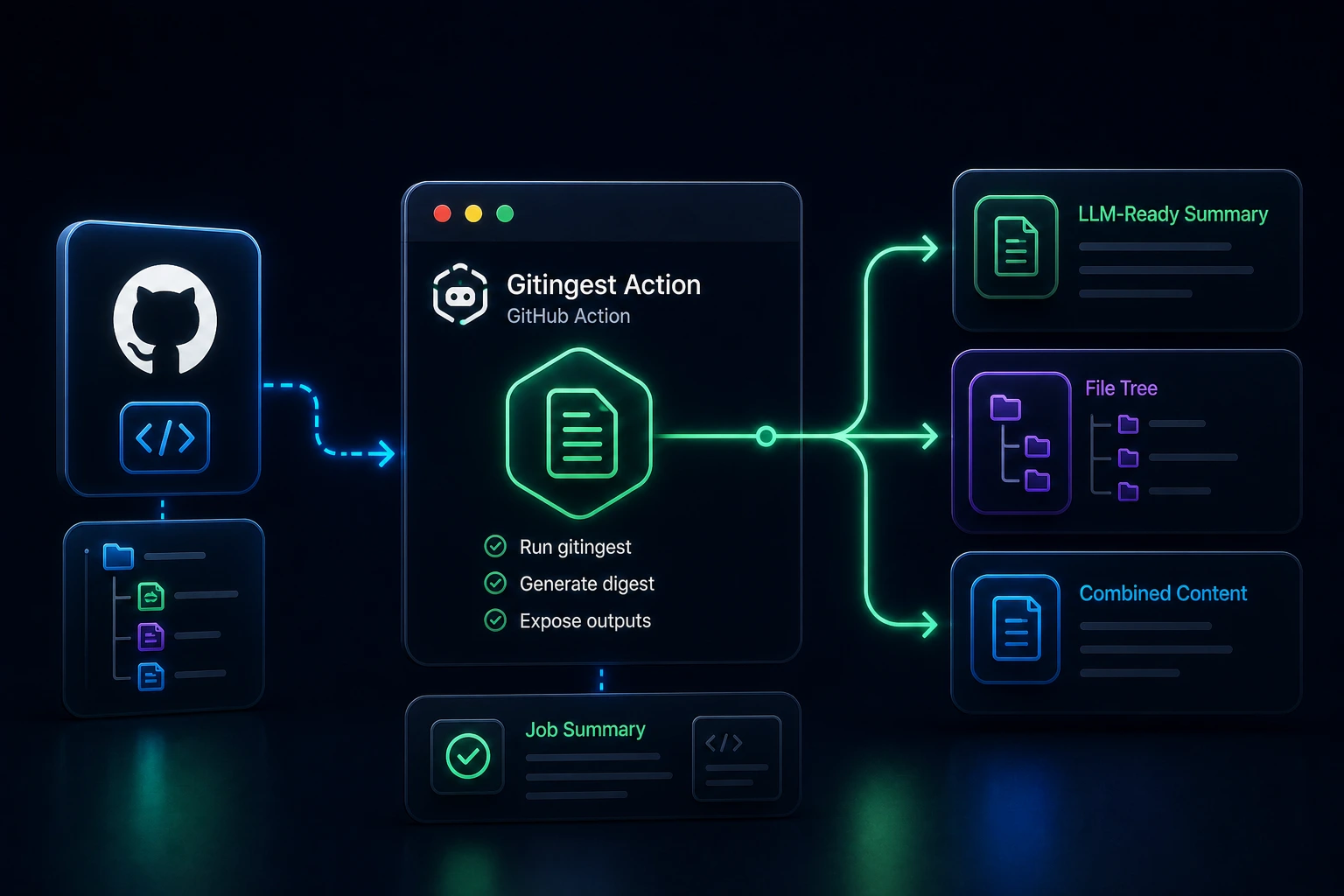
The Gitingest Action wraps gitingest so it behaves like a first-class step in GitHub Actions.
It doesn’t reimplement anything. Instead, it focuses on the missing layer:
- Runs gitingest with your configuration
- Writes outputs to a predictable
output-dir - Exposes file paths as step outputs
- Populates the Job Summary for quick inspection
So instead of stitching together scripts, you get a repeatable, drop-in step.
Start With One Step
By default, the source parameter points at your current workspace, which is what you want right after actions/checkout. You can also point source at a remote repository URL and optionally set branch or tag:
name: Analyze GitHub repository
on: workflow_dispatch

jobs:
  digest:
    runs-on: ubuntu-latest
    steps:
      - name: Analyze GitHub repository
        uses: ysskrishna/gitingest-action@v1
        id: digest
        with:
          source: 'https://github.com/ysskrishna/pypi-package-stats'
          branch: 'main'

      - name: Display digest summary
        run: |
          echo "GitHub repository digest summary"
          echo "================================"
          cat ${{ steps.digest.outputs.summary-file }}
Note: Give the step an
idwhenever something later needs its outputs (for example${{ steps.digest.outputs.summary-file }}, or in generalsteps.<id>.outputs.<name>). Same idea as any other action: you skip guessing paths and scraping logs.
Outputs
All outputs land under output-dir. The action also exposes their paths as step outputs:
| Output | File | What it is for |
|---|---|---|
summary-file | summary.txt | Quick stats: file counts, token estimates, repo metadata |
tree-file | tree.txt | Directory layout |
content-file | content.txt | Concatenated file contents; typical input for LLMs or downstream analysis |
This gives you a consistent input format for:
- LLM prompts
- automated code reviews
- reporting pipelines
The Job Summary also mirrors the high-level view, so reviewers can quickly inspect results without downloading artifacts.
Compose it like any other Actions step
Once paths and outputs are nailed down, the rest is normal CI choreography:
- Feed
content-fileinto an LLM or analysis step as the body of what you summarize or score. - Upload all three outputs (or only
summary-file/tree-file) when you need downloadable artifacts or compliance trails. - Post short summaries onto pull requests without re-running ingestion.
- Cron a weekly digest pipeline so freshness is automatic.
Example Workflows Worth Copying
The examples repository ships complete YAML for common patterns:
- Analyze remote repository: URL plus optional
branch - Filter files with patterns:
include-patterns/exclude-patterns - Analyze specific tag: release or tag pin
- Monorepo scoped analysis: subdirectory only
- Save digest as artifact: persist outputs on the run
- Selective artifact upload: upload summary or tree only
- Scheduled weekly digest: cron-driven reports
Those files are better starting points than retyping inputs from memory.
Private Repositories
Pass a token with read access to the target repository (usually a secret) and keep scopes minimal:
- uses: ysskrishna/gitingest-action@v1
  with:
    source: 'https://github.com/owner/private-repo'
    token: ${{ secrets.PRIVATE_REPO_TOKEN }}
Store the secret at repo or org level and avoid reusing a token that has more permissions than the job needs.
What You Get (and What It Isn’t)
In one step you can:
- Produce three stable artifacts for machines and humans
- Target the workspace, a remote clone, or a scoped path
- Surface a Summary tab overview without extra
echochoreography
What you do not get is a substitute for semantic code search or a live IDE index. The digest is a point-in-time text bundle for the tree and patterns you configured. Treat it as the right input shape for LLM workflows and audits, not as real-time telemetry.
Install It
Start from the GitHub Marketplace, or browse the source at ysskrishna/gitingest-action.
Want a shorter product overview first? See Gitingest Action.
Prefer copy-paste workflows? Use the examples repository.
Upstream library and design credits: gitingest by Romain Courtois and Filip Christiansen.
If this saves you time, a star on the repo helps others find it.